Counsellors

A professional workspace from assigned referral to outcome follow-up.

Mindful Message gives counsellors a focused dashboard for the cases assigned to them: referral context, session scheduling, appointment history, feedback requests, wellbeing measures, guidance, and account controls.

Counsellor assessment tracking screen captured from the real demo application

Counsellor role flow

How a counsellor uses the system end to end.

The counsellor path starts with controlled access, moves through assigned referrals and session work, then closes the loop with feedback, assessments, status updates, and account controls.

  1. Phase 1

    Access

    Join with the right controls

    A counsellor enters through an approved account, completes professional setup, and works inside the counsellor dashboard.

    Role action
    Complete profile, verification, account preferences, notification settings, and any required service guidance.
    Platform support
    Secure access, role permissions, verification evidence, settings, and guideline pages keep each workspace tied to the right responsibilities.
  2. Phase 2

    Assignment

    Review assigned referrals

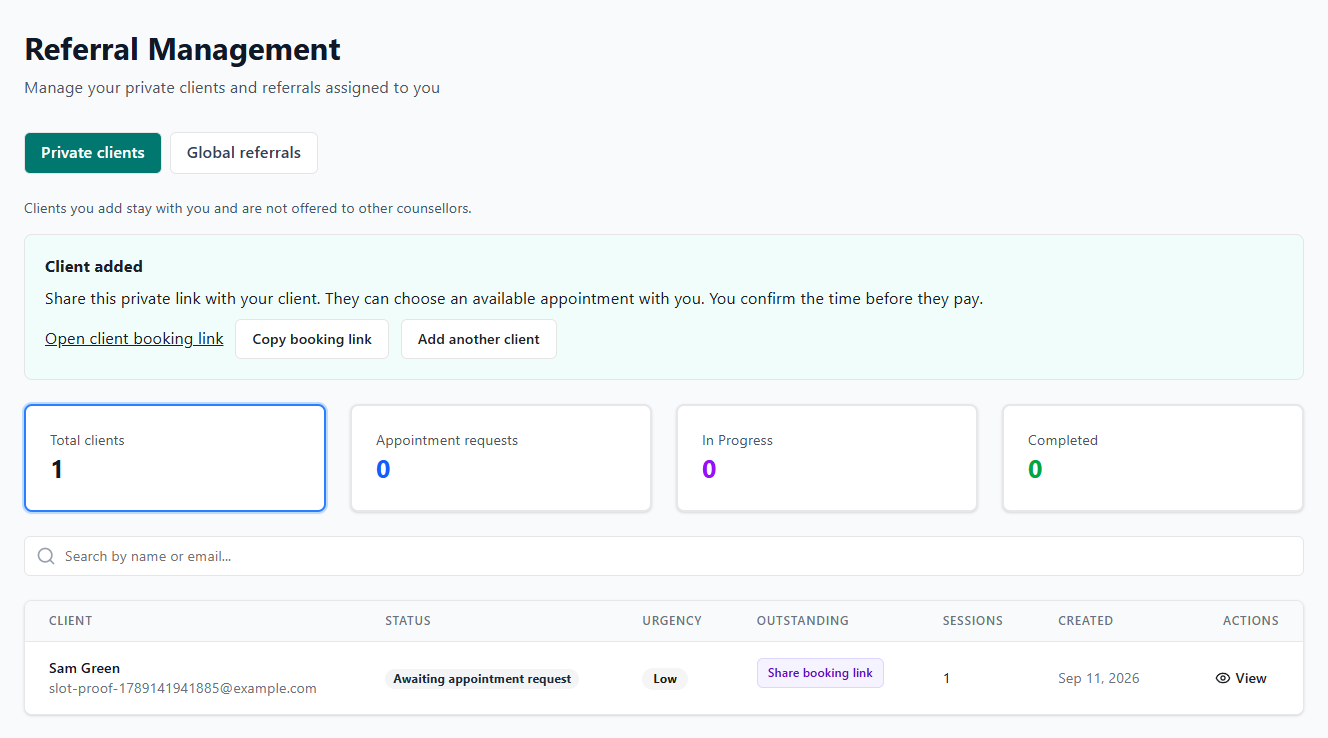
    The counsellor sees referrals allocated to them, reviews client context, and moves the referral through assigned, in-progress, and completed states.

    Role action
    Open the assigned referral, understand language and support context, and update progress as work begins.
    Platform support
    Referral Management and referral detail views keep assigned work visible without exposing unrelated cases.
  3. Phase 3

    Sessions

    Schedule and manage sessions

    The counsellor books sessions for active referrals, manages upcoming appointments, and uses the calendar to keep work organised.

    Role action
    Create sessions, monitor upcoming appointments, update appointment status, and review completed session history.
    Platform support
    Booking Management includes upcoming sessions, calendar, schedule-session, and session-history surfaces.
  4. Phase 4

    Measures

    Send feedback and assessments

    After sessions, the counsellor can request feedback and recognised wellbeing measures so progress is captured close to the work.

    Role action
    Choose relevant requests such as feedback, WHO-5, PHQ-9, GAD-7, or SDQ and track whether they are completed.
    Platform support
    Assessment Tracking and psychometrics workflows record request status, reminders, expiry windows, and submitted outcomes.
  5. Phase 5

    Closure

    Close the loop responsibly

    The counsellor completes session status, keeps their own workflow current, and supports reporting without widening access beyond the care team.

    Role action
    Mark work complete, keep session records current, use guidance pages, and review account or invoice settings when needed.
    Platform support
    Session history, assessment tracking, privacy routes, guideline pages, and invoice settings support the end of the pathway.

Counsellor workspace

The role boundary is practical: enough context to deliver support, not everyone outside the assigned caseload.

Assigned referral queue

Counsellors work from the referrals allocated to them and can update assignment progress as support begins, continues, and completes.

Booking management

Upcoming sessions, calendar views, schedule-session forms, and session history keep the practical appointment workflow together.

Assessments and feedback

Counsellors can request feedback, WHO-5, PHQ-9, GAD-7, and SDQ measures, then track request status and completion.

Guidance and account controls

Policies, procedures, privacy routes, notification settings, account settings, and invoice settings sit inside the same role boundary.

Privacy-aware delivery

Counsellor access is focused on assigned work and service quality.

The platform supports the professional workflow without turning the counsellor into an admin user. Assigned referrals, appointments, assessments, guidance, and account settings sit inside a distinct counsellor role.

Assigned referrals stay separated from unrelated organisation cases.
Session status and assessment requests sit in the care workflow.
Privacy, consent, policy, and procedure routes are available when needed.
Reports and organisation status visibility can be produced without broadening counsellor access.

Next step

See the role flow beside the real demo screens.

The gallery includes a real counsellor assessment-tracking capture, plus the organisation and admin screens that show how referral work moves around the service.